IQAir AirVisual | Air Quality
- 4.7
- Rating
- 5.00M
- Installs
- Free
- Price

 Analysis by App-foxy
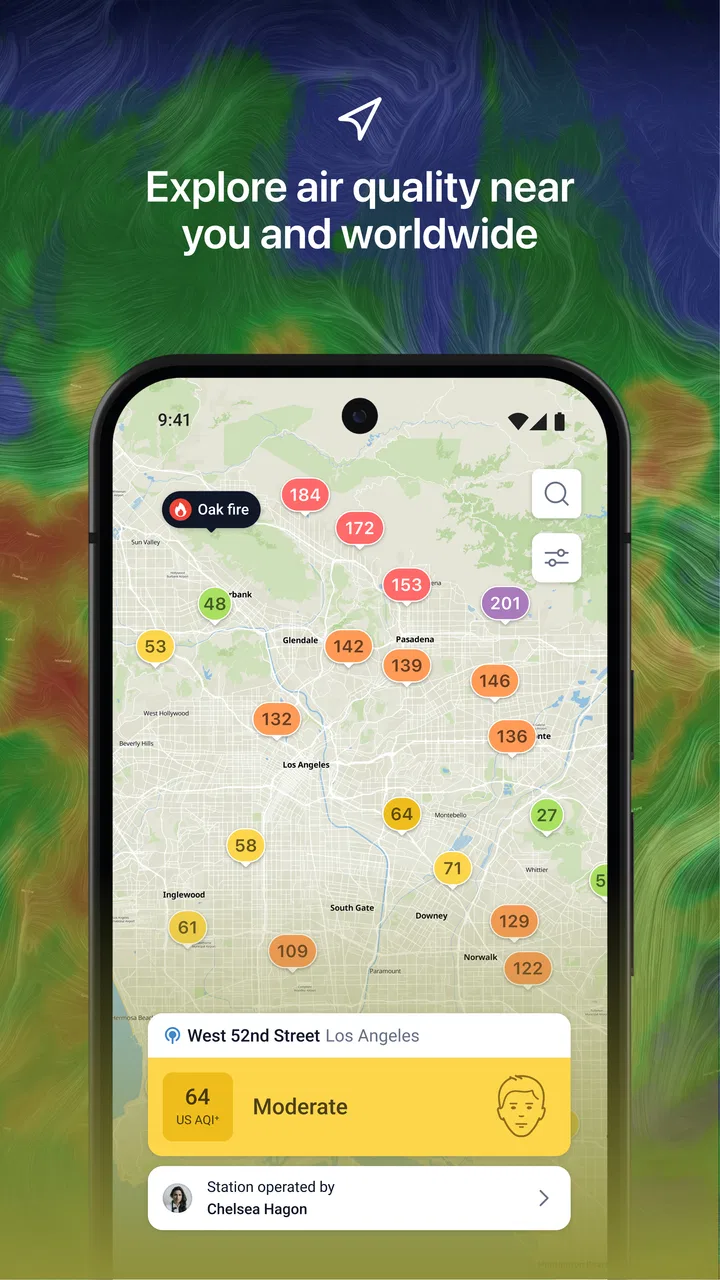
When I want to know whether the air outside is merely unpleasant or genuinely worth planning around, I prefer more than a simple weather icon. IQAir AirVisual is built for that exact question: it combines air-quality information with weather context, wildfire awareness, pollen details, and PM2.5 forecasting in one weather-focused app. I found it most useful when I treated it as a planning tool rather than a dramatic warning machine.
The app is free, rated for Everyone, and developed by IQAir AG. Its strong 4.7 average from around 338 thousand ratings and more than 5 million installs suggest that it has become a familiar choice for people who want air-quality information close at hand. Those figures do not automatically make every reading perfect for every location, but they do tell me that this is not an obscure utility with an untested interface.
My overall impression is positive, with an important qualification: this is best for people who actively use air-quality information to make decisions. If you only want tomorrow’s temperature and rain chance, a standard weather app will probably feel simpler. If smoke, fine particles, pollen, or outdoor exercise affect your routine, the additional detail here has a practical purpose.
You May Also Like

 Blood Strike: 2.5 Anniversary
Blood Strike’s Loadouts Turn Every Drop Into a Tactical Gamble
A close look at Blood Strike’s custom loadouts: how fast access to signature weapons reshapes its battle royale rhythm, rewards preparation, and narrows the gap between fights.

 Pandora - Music & Podcasts
Pandora’s Music Is Easy to Start, but Harder to Recover
Pandora’s strength is its low-effort path from a seed to a station. Its weak spot is how much confidence it asks you to place in connection, setup, and quiet recovery.

 8 Ball Pool
 Is Built on Rivalries, Rematches, and Routine
A close look at the rivalries, rematches, shared routines, and unanswered safety questions that turn a quick pool match into a persistent mobile community.

 Samsung Music
’s Quiet Strength Is Playing What You Already Own
Its reach comes less from spectacle than from dependable access to a personal library. That simplicity is both the app’s strongest retention engine and its ceiling.

 AccuWeather: Weather Radar
AccuWeather Review: A Quick, Clear Forecast for Everyday Decisions
For everyday plans, the best forecast is the one you can understand quickly. AccuWeather makes rain timing, radar, and local conditions easy to act on, with a few trade-offs.

 Hill Climb Racing
Why Hill Climb Racing Still Turns Crashes Into One More Run
A tiny car, a bumpy hill and one more upgrade: Hill Climb Racing keeps resurfacing because its simple chaos makes every near-miss feel personal.
More From Our News Desk



What the app is really useful for
I find the app most useful when I have a real decision to make, rather than when I’m browsing weather out of habit. Checking conditions before exercise or opening the windows can help me compare options and choose a better time, while keeping in mind that a forecast is guidance, not a guarantee. That practical focus also makes it easier to judge how the app handles more demanding, repeated checks.
Air quality as a daily planning layer
The central strength of the app is that it makes air quality part of the same conversation as weather. Instead of checking whether it will rain and then separately wondering about pollution, I can look at the conditions that influence whether a walk, run, commute, or open-window afternoon feels sensible.
That distinction matters because comfortable temperatures can be misleading. A cool morning may still be a poor time for strenuous exercise if fine-particle levels are elevated. Conversely, a warm day can remain perfectly manageable when the air-quality outlook is favorable. The app encourages a more complete decision instead of letting the temperature forecast do all the work.
PM2.5 is especially relevant here. These are very small airborne particles, and the app puts that kind of information near the center of its purpose rather than hiding it behind a specialist menu. I appreciate that focus because it gives the forecast a concrete meaning: I am not just looking at an abstract color, but at a condition that can influence how long I stay outside and whether I change an activity.
A realistic morning routine
Imagine that I am planning a school run, a bike ride, or a morning walk before work. I can check the local air-quality status first, then look ahead to see whether conditions are expected to improve or worsen. If the air is poor now but the forecast points to a better window later, I can move the activity instead of canceling it automatically.
That workflow is more useful than reacting to a single number. A current reading answers “what is happening now?” A forecast helps answer “when should I go?” I would still use judgment, particularly for children, older adults, or anyone with respiratory sensitivity, but the app gives me a clearer starting point than a generic weather screen.
Wildfire information adds another important use case. During smoke events, people often need to check conditions repeatedly rather than once in the morning. The app’s focus on wildfire and PM2.5 forecasting makes it more relevant in those periods than a conventional weather application that mainly reports temperature, wind, and precipitation.
Where pollen fits into the picture
Pollen is useful for a different kind of planning. Someone with seasonal allergies may care less about a broad air-quality label and more about whether outdoor exposure is likely to be uncomfortable. Having pollen information alongside pollution and weather helps separate several causes of a bad day outdoors.
I would not treat the pollen view as a medical diagnosis, and I would not use a favorable air-quality reading as proof that allergy symptoms will disappear. Weather, local vegetation, and personal sensitivity can all change the experience. Still, placing these topics together is convenient because it reduces the need to jump between unrelated apps.
The interface and the learning curve
The main screen is easier to understand once I know what I am looking for, but newcomers may need a little time to interpret the different layers. Air-quality categories, particle information, forecasts, wildfire conditions, pollen, and weather can compete for attention. The app is not difficult in the technical sense, yet it asks the user to distinguish between several kinds of environmental information.
My advice is to begin with one question: “Should I change my outdoor plan today?” Then use the current conditions and forecast to answer it. Trying to understand every available indicator at once can make the app feel more complicated than it needs to be.
Trust comes from visible information, not just a polished screen
For an air-quality app, trust is more complicated than attractive colors or a reassuring badge. I want to know what I am looking at, how current it is, and whether the app gives me enough context to avoid overreacting to one isolated reading. IQAir AirVisual feels most trustworthy when I use it as a source of environmental context and compare the information with the situation around me.
For example, if the app shows worsening conditions while I can see smoke or haze nearby, the information becomes easier to interpret. If the reading seems surprising, I would check the forecast trend and local circumstances before making a major decision. That is not a criticism of this app alone; air quality can vary by neighborhood, time of day, wind, and the location of monitoring equipment.
The important point is that a forecast should support judgment, not replace it. I would not use any single app as the sole basis for an urgent health decision. For routine planning, however, this one gives enough relevant context to be genuinely useful.
Controls, accounts, and personal choices
I pay attention to whether an app lets me decide how much of it I want to use. IQAir AirVisual works as a focused information tool, and I prefer approaching it that way: open it when I need environmental information, review the local conditions, and leave when I have made my plan.
Account-related choices deserve the same care as notification choices. If the app presents an option to create or use an account, I would consider whether that is necessary for my intended workflow before signing up. A person who only wants occasional local checks may not need to build a deeper profile around the service, while someone who follows conditions regularly may find additional control useful.
I also recommend reviewing notification settings rather than accepting every alert automatically. Alerts can be valuable during wildfire smoke or a sudden deterioration, but too many warnings can become background noise. A practical setup is to keep notifications that match a real decision you need to make, such as whether to exercise outdoors or open the windows, and disable anything that does not change your behavior.
Because privacy expectations vary, I would read the app’s current permission and data disclosures on the device before granting access. I do not assume that an air-quality app needs every possible permission simply because it offers forecasts. The safest habit is straightforward: allow only what makes sense for the features I actually plan to use, and revisit those choices if my use changes.
Data-sensitive moments
Location is the most obvious sensitive moment for an app like this. Local air-quality information is more useful when the app knows which area I care about, but I still want control over whether that location is supplied continuously, only while using the app, or entered in another way when available. I would choose the least intrusive option that still gives me a useful local forecast.
This is particularly important when traveling. I may want to check air quality in a destination without leaving location access enabled all day. A deliberate check before a hike, commute, or flight is different from allowing an app to follow my movements continuously. I consider that distinction part of responsible app use, not an inconvenience.
Notifications are another data-sensitive and attention-sensitive area. An alert about smoke can be meaningful, but the value depends on whether it reaches me at the right time and reflects a place I actually care about. I would rather configure a small number of relevant alerts than treat every notification as equally urgent.
When an app deals with health-adjacent information, I also avoid entering more personal detail than necessary. Air quality can affect people with asthma or allergies, but that does not mean I need to share medical information to benefit from a forecast. I use the environmental reading to inform my own choices and follow professional advice for personal health decisions.
Three less obvious ways I would use it
First, I would use the forecast to compare time windows rather than simply labeling an entire day as good or bad. If I have flexibility, checking the expected change before exercising can be more useful than checking once after I have already put on my shoes. This turns the app into a scheduling aid.
Second, I would use it during home ventilation decisions. On a clear-looking day, I might be tempted to open windows for hours, but an air-quality check can add another piece of evidence. If outdoor particle conditions are poor, a short airing period or a different time may make more sense. The app does not control my home, but it helps me avoid relying only on appearance.
Third, I would use it to separate weather discomfort from pollution discomfort. A hazy, warm, stagnant day can feel unpleasant for several reasons. Looking at weather, PM2.5, and pollen together helps me form a more informed explanation and choose a response, such as moving exercise indoors, reducing exposure, or simply waiting for conditions to change.
How it compares with ordinary weather apps
A normal weather app usually wins on speed when I only need temperature, rain, wind, or a basic hourly forecast. Many people already have one installed, and adding another app can feel unnecessary if air quality is not part of their routine.
IQAir AirVisual earns its place by going deeper into environmental conditions. Its emphasis on PM2.5, wildfire situations, pollen, and air-quality forecasting makes it more suitable for sensitive users, outdoor athletes, parents planning activities, and anyone living through recurring smoke or pollution events. The trade-off is that it can feel more specialized and information-heavy than the weather app I open casually.
I would not replace a detailed weather service with this app if my main concern is radar, storm tracking, or precipitation timing. I would use the two together when needed: one for the mechanics of the weather, the other for the quality of the air I will actually breathe.
Who should use it, and who should skip it
I think it is a strong fit for people with allergies or respiratory sensitivities, runners and cyclists, families who spend a lot of time outdoors, and residents in areas affected by wildfire smoke. It is also useful for anyone who wants a quick environmental check before opening windows, commuting, or planning a long outdoor activity.
I would skip it if I rarely care about air quality and only want a basic forecast. In that situation, the extra categories may add clutter without changing any decisions. I would also avoid treating it as a replacement for medical guidance, emergency instructions, or official local warnings during a serious event. An app can inform a plan, but it should not be the only source used when authorities issue urgent advice.
Version, availability, and everyday practicality
The current version is 7.3.5-1.1, and the app is available at no charge for devices running operating system version 10 or newer. That makes it approachable for many users, although anyone with an older device should check compatibility before expecting to install it.
The free price is a real advantage for trying the service without committing money first. I can see whether its local information, forecast style, and alert behavior fit my routine before deciding whether it deserves a permanent place on my phone. The Everyone content rating also makes it suitable as a general household information tool, though adults should still help younger users interpret health-related environmental information sensibly.
My main friction is not the cost; it is the need to interpret the information responsibly. A single air-quality label can be tempting to read as a complete answer, while the useful decision often depends on the trend, the activity, the duration outdoors, and the people involved. The app gives me more detail than a basic weather tool, but that detail requires a little attention.
My cautious verdict
After using IQAir AirVisual as an air-quality companion, I see its value most clearly in ordinary decisions: choosing when to run, deciding whether to open the windows, checking conditions during smoke, or planning outdoor time around pollen and particle forecasts. It is not just another temperature screen, and that specialization is exactly why I would recommend it to the right person.
I especially like the way it brings several environmental concerns into one place without forcing me to treat them as identical. Weather, pollen, wildfire smoke, and PM2.5 can affect a day differently, and checking them together leads to better decisions than relying on a single generic forecast.
My recommendation comes with a simple rule: use the app to improve awareness, not to create false certainty. Review the current reading, look at the forecast, consider your own sensitivity and activity, and adjust permissions and alerts to match your needs. If you want that kind of control and air quality genuinely affects your routine, this free app from IQAir AG is a sensible choice. If you only need rain and temperature, a conventional weather app will probably be the cleaner option.
In short, IQAir AirVisual is most convincing when it turns environmental information into a practical choice. Its best feature is not any single screen, but the ability to connect air quality with the moment when I need to decide whether to go out, wait, ventilate, exercise, or take extra care.
FAQs for IQAir AirVisual | Air Quality
01What is IQAir AirVisual and how does it work?
IQAir AirVisual is an app designed to provide real-time air quality information. It works by aggregating data from thousands of monitoring stations worldwide, offering insights into air pollution levels and forecasts. Users can access detailed reports on pollutants and receive health advice based on current air quality conditions.
02How accurate is the air quality data provided by the app?
The app collects data from reputable sources, including government and environmental monitoring stations. While it strives for accuracy, users should note that real-time air quality can fluctuate due to various factors. It's advisable to use the app as a guide and consider local conditions for the most precise assessment.
03Can I use the app to monitor air quality in multiple locations?
Yes, IQAir AirVisual allows users to monitor air quality in multiple locations. You can set up notifications for specific areas and receive alerts when air quality changes. This feature is particularly useful for travelers, parents, or anyone concerned about air quality in different regions.
04Does the app offer health recommendations based on air quality?
Absolutely. IQAir AirVisual provides health recommendations tailored to current air quality levels. These suggestions help users make informed decisions about outdoor activities, especially for sensitive groups like children, the elderly, or those with respiratory conditions. The app aims to promote healthier living by offering actionable advice.
05Is IQAir AirVisual free to use, and are there any in-app purchases?
The app is free to download and offers a range of features at no cost. However, there may be premium features or additional services available through in-app purchases. These can enhance the user experience by providing more detailed insights or personalized alerts for air quality monitoring.
Pros
- Comprehensive global air quality data.
- Easy-to-use interface with clear visuals.
- Real-time pollution alerts and forecasts.
- Personalized health recommendations.
- Integration with smart home devices.
Cons
- Some data may be delayed in remote areas.
- Limited offline functionality.
- Requires location permissions.
- Premium features behind a paywall.
- Occasional app crashes reported.

IQAir AirVisual | Air Quality
Gallery